
Why SAP Automation Matters
As SAP pushes organizations toward S/4HANA migration, automation becomes critical for reducing manual effort and ensuring quality. Tricentis Test Automation (TTA) also commonly referred to as Tricentis Tosca, has emerged as the preferred tool for SAP automation, supporting SAP GUI, Fiori, and S/4HANA, along with 160+ other technologies like Oracle, Salesforce, and ServiceNow. Its cloud-based Tosca version further addresses modern application needs and has fast become the point of discussions in the automation community.
Tosca for SAP is also sold as SAP Enterprise Continuous Testing by Tricentis, an SAP Solution Extension built on Tosca.
For SAP-specific test strategy, see SAP testing.
Tosca is a potent tool to automate not only SAP but lots of different enterprise applications like Oracle, Salesforce, ServiceNow. It supports 160+ technologies from legacy to advanced and a cloud-based Tosca is already in the market to fill the gaps in modern applications which might be missed by desktop-based applications.
In this blog, we offer a complete technical guide on starting your SAP Automation with Tricentis Tosca.
Getting Started: Automating SAP GUI with Tosca
Let’s assume you have Tosca Commander installed and want to automate your SAP GUI instance.
The very first step you need to take cognizance of is make sure that your Tosca commander is interacting with SAP GUI instance. To do this, SAP scripting needs to be enabled both on the server and the corresponding client to be able to steer SAP applications with Tosca.
It means you’re technical telling SAP that an Automation tool is going to be used. This process is divided into 2 phases:
(A) Activating script on the SAP server
(B) Activating script on the SAP client
(A) Activating script on the SAP server
You must activate scripting on the server to steer SAP applications via the SAP scripting interface.
Keep in mind that Tricentis recommends enabling scripting only in Development and Quality systems in order to prevent the unintentional execution of automated tests in Production systems.
Scripting parameters
The parameter sapgui/user_scripting must be set to TRUE (Please note that this value is case-sensitive). The default value of the parameter is FALSE.
If one of the following parameters is available, it must have the value FALSE. The available parameters depend on the SAP version used.
- sapgui/user_scripting_disable_recording
- sapgui/user_scripting_force_notification
- sapgui/user_scripting_per_user
- sapgui/user_scripting_set_readonly
- sapgui/nwbc_scripting
Procedure
Step 1: Open transaction RZ11 in the system.
Step 2: Enter the parameter name sapgui/user_scripting and click on Display.
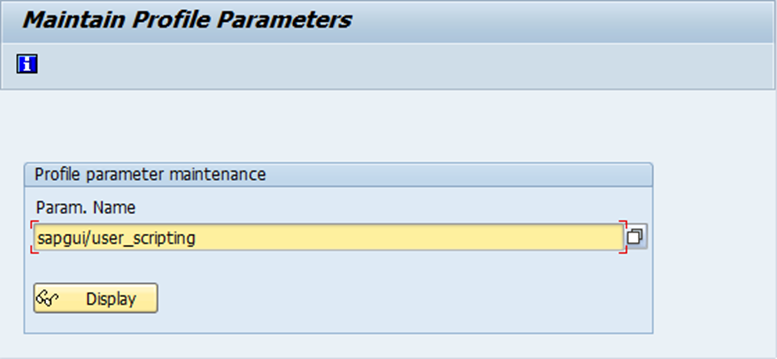
Step 3: If the parameter value is currently set to FALSE, click on the Change Value button in the toolbar.
Step 4: A window will open. Enter the new value TRUE and save your changes.

Step 5: Repeat the previous steps for all available parameters mentioned above.
(B) Activating script on the SAP client
You have to activate scripting on the client to steer SAP applications via the SAP scripting interface.
Step 1: Open the menu in the Logon window by clicking on the icon and select the menu entry Options.
Step 2: Switch to the view Accessibility & Scripting->Scripting and enable the scripting function.
Step 3: In addition, disable the following options: Notify when a script attaches to SAP GUI and Notify when a script opens a connection.
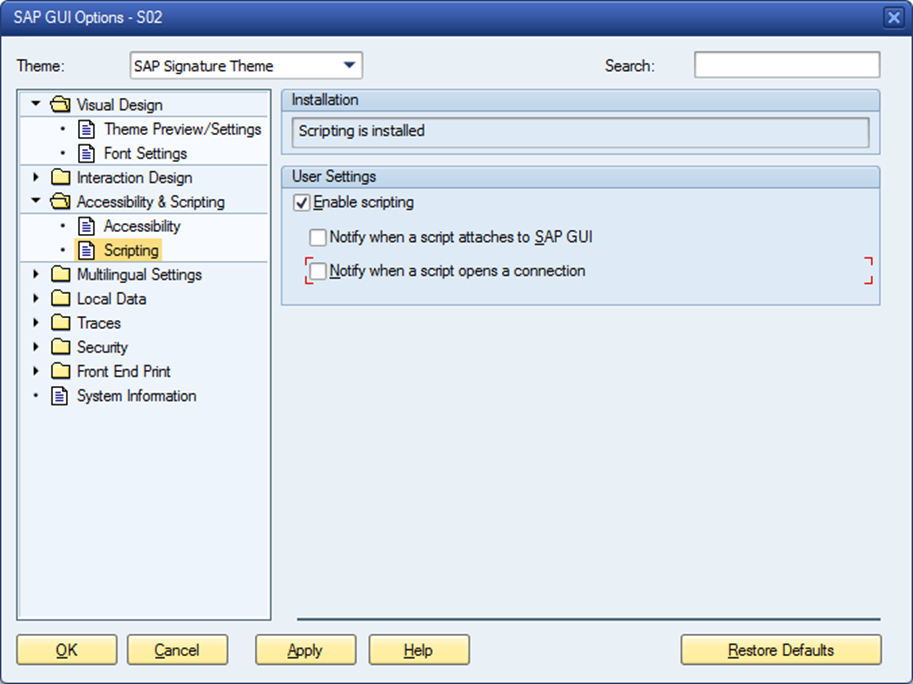
Activating Modal Dialog Boxes
To activate modal dialog boxes on the client to steer SAP applications:
Step 1: Open the SAP GUI window and select the menu entry Help->Settings on any screen.
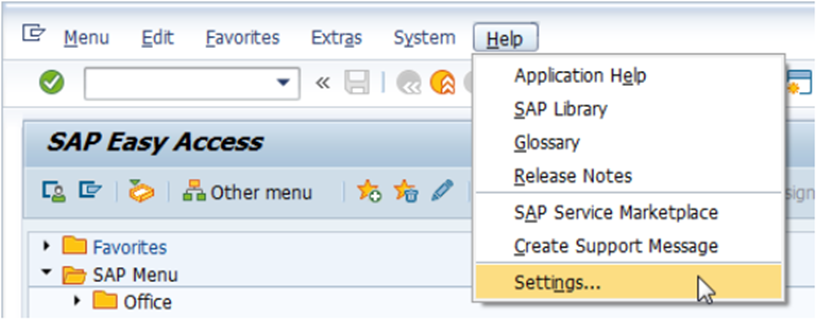
Step 2: Switch to the F1 Help tab and select the option In Modal Dialog Box in the Display section.
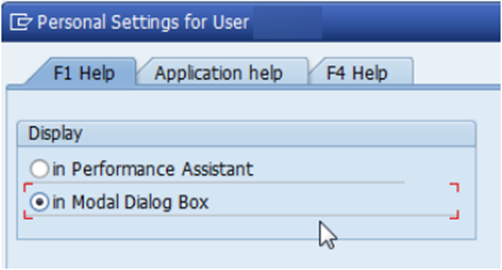
Step 3: Switch to the F4 Help tab and select the option Dialog (modal) in the Display section.
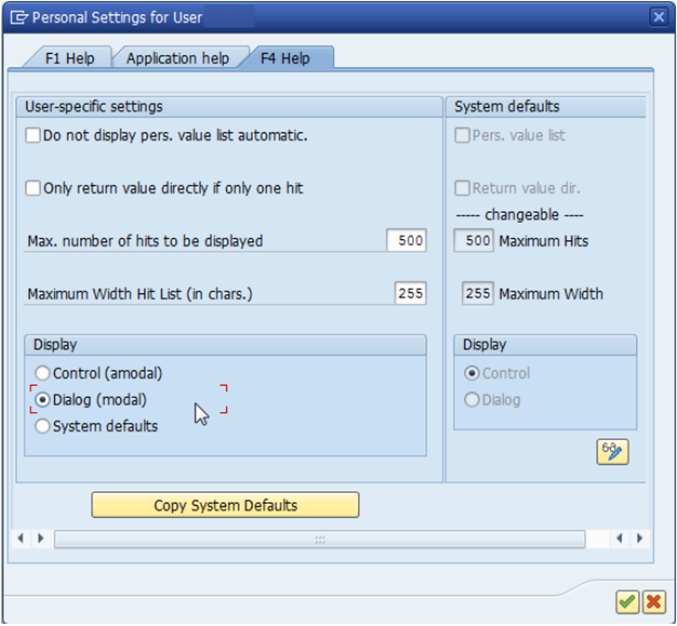
Step 4: Confirm by clicking on the green check mark button.
Please note, that this is a per-user setting. The settings have to be configured on each client you want to test your application with. The SAP system administrator can set up the system default as Dialog (modal).
The SAP system is now ready for test automation with Tosca.
The Merito Advantage
Merito offers:
- SAP S/4HANA migration automation
- End-to-end SAP GUI and Fiori automation
- 20+ years of expertise in automation of enterprise applications
Ready to automate SAP with Tricentis Tosca? Contact Merito today for a consultation.
Reference - KB0013511